Modify table structure
The Modify table structure tool allows you to easily change the design of an existing data table or map layer directly in the cloud. You can add new data fields, delete ones you no longer need, rearrange their order, or change their properties even after you have already collected data.
Usage via Table manager
You can access this tool from the Table manager. Select the table you want to modify from the list, scroll down to the Danger zone section in the details panel, click the header to expand it, and select Modify table structure. A dialog will appear where you can reorganize your table's columns.
Note – Why is the "Modify table structure" button hidden? This button is displayed only to administrators and the user who created the table when a physical base table (Virtual table: No, rather than a shared view from another application) is selected and is currently open in the application (Loaded: Yes). If the table is not open, open it first via Open table.
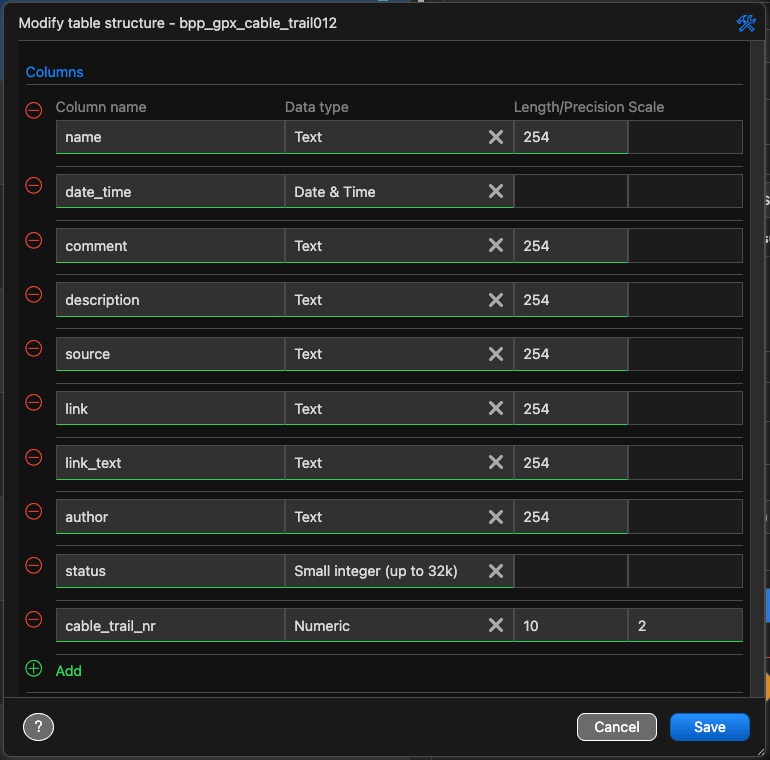
Dialog Properties
Columns
In this section, you can interactively adjust the structure by adding, removing, reordering, or changing data columns
(up to 100
in total). By clicking the
- Column name: A valid, unique name for the data field. If you rename an existing column, the system will securely update the name while preserving all your stored data.
- Data type: The type of information the column holds (e.g., Text, Date & Time, Small integer (up to 32k), Numeric).
- Length/Precision: For text fields, this sets the maximum allowed number of characters. For numeric fields, it sets the total number of digits.
- Scale: The maximum number of decimal places allowed for numeric fields.
Important Warnings
- Column reordering: Changing the logical order of your columns safely updates your table's layout behind the scenes. This action is purely structural and ensures all your existing records remain perfectly intact.
- Adding columns: You can freely add new columns to capture additional information as your project grows.
- Deleting columns: Clicking the
icon next to a column will mark that column and all data stored within it for permanent deletion. The system will ask for your final confirmation upon clicking the Save button to prevent accidental data loss. - Workspace dependencies: If you rename or delete columns that are actively used in your workspace (for Dropdown lists / Lookups or Relation objects display), the system will automatically detect this and safely adjust or remove those links to prevent application errors. You will simply be prompted to save your adapted workspace afterwards.
- Changing data types and data conversion: When changing the data type of an existing column (e.g., from
Text to Small integer (up to 32k)), every single value in that column must be compatible with the
new data type. The database will automatically attempt to convert existing values to the new format. The
operation will only succeed if the compatibility is perfect. If the database detects an incompatible value, the
process will be safely aborted, and your data will be preserved in its original format.
Empty strings (text with no characters"") are not equivalent toNULL(empty value). For example, if you are converting a text field to a numeric or date field, the column must not contain empty strings. Before modifying the structure, use tools like the Update Column to replace them with an appropriate numerical value (e.g.,0) or a trueNULLvalue. - History tracking: When you rename a column, reorder it, or successfully change its properties, your past edits and tracking history for that column are safely preserved and automatically transferred to the new structure.